

Last Updated: June 12, 2026
Spatial computing is reshaping our understanding of screens, apps and digital interfaces. It’s removing the need for users to interact with computers solely via flat displays, and instead overlays digital content onto the physical world around us. Apple’s description of its Vision Pro as a “spatial computer” that merges digital content with physical space and Microsoft’s explanation of mixed reality being the merging of physical and digital worlds and an environment optimized for natural 3D interaction is revealing of this underlying paradigm shift.
It’s important because it’s about much more than simply a new generation of hardware; it is about a new form of interaction where eyes, hands, voice, movement and environment become part of the UI. It’s precisely for this reason why so many see spatial computing as the “next major evolution” following mobile computing-not so much to replace our smartphones overnight but to broaden what computation could and should feel like when the screen no longer must be restricted to within a rectangle. Apple’s Vision Pro and vision OS are built around that idea, with an “infinite canvas” and three-dimensional interaction model.
Table of Contents
What Is Spatial Computing?
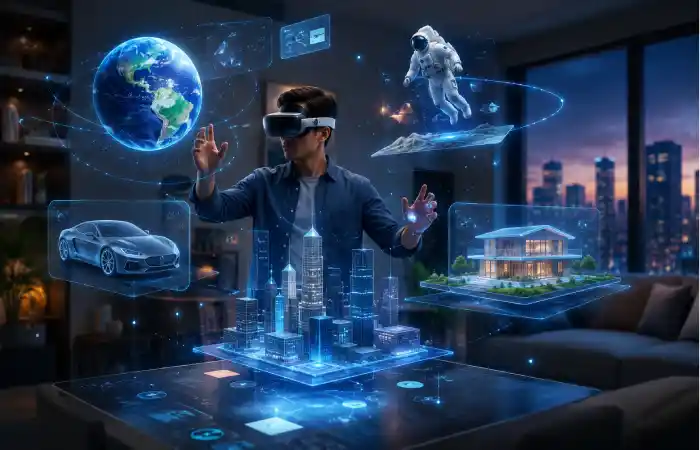
Spatial computing is a nascent concept that enable computing in and with space. Broadly, it’s a way of integrating digital content with physical space such that the digital content seems like “native object” of the space at the specific time, such as projecting a calendar beside the desk, placing a product on the table, or launching a training session in front of the eye. Apple’s official language for Vision Pro emphasizes this blend of digital content and physical space, while its developer platform highlights a spatial computing experience built on vision OS.
The fundamental difference is the previous system was screen-first and spatial is environment-first. You are not just touching a screen anymore; you are interacting with an environment that takes into account space, distance, position, depth, and motion. That gives the interaction a human feel, and it works particularly well for things like design, collaboration, education or visualization. Microsoft’s mixed reality definition also stresses natural and intuitive 3D interaction, which captures the same direction this field is heading.
Why Spatial Computing Matters
Spatial computing matters because people do not naturally think in menus, tabs, and windows. We think in objects, spaces, gestures, and context. An actual space is a better way for our brains to process data at a speed that surpasses an overwhelmed screen when the data become visual and interactive. That’s why immersive technologies are receiving much interest in the domain of education, healthcare, product design, remote cooperation and business training.
It also matters because the technology is becoming more capable. Modern devices can track hands, map rooms, understand depth, and anchor digital content in real space. Apple states that Vision Pro leverages cutting edge machine learning for functions like room mapping, hand tracking and Personas. These aren’t marginal advances, they form the foundational technologies that render spatial interfaces into something intuitive and realistic.
Comparison Table: AR, MR, VR, and Spatial Computing
The easiest way to understand spatial computing is to compare it with the technologies that surround it.
| Technology | Core idea | User experience | Best for | Example |
| Augmented Reality (AR) | Digital pieces are implemented onto the real world. | You can still see where you are but with additional information overlaying it | Navigation assistance, preview for retail, lightweight support | Phone based filters, overlays of products |
| Mixed Reality (MR) | Physical and digital realms merge and can seamlessly interact. | The virtual objects appear grounded in the real world | Training, design reviews, cooperation | A hologram work place. |
| Virtual Reality (VR) | You’re totally in a digital world. | A fabricated world supersedes physical existence. | Gaming, simulation, deep immersion | VR headsets and virtual worlds |
| Spatial Computing | Computing happens in and around physical space | Apps respond to your room, motion, gaze, hands, and voice | Productivity, immersive collaboration, design, content creation | Apple Vision Pro |
Both AR, MR and VR are included in immersive computing, however spatial computing is a larger overarching concept that covers them. It is more about the new way to think about computing (relative to the environment around the user) than any particular class of headset.
Augmented Reality Technology
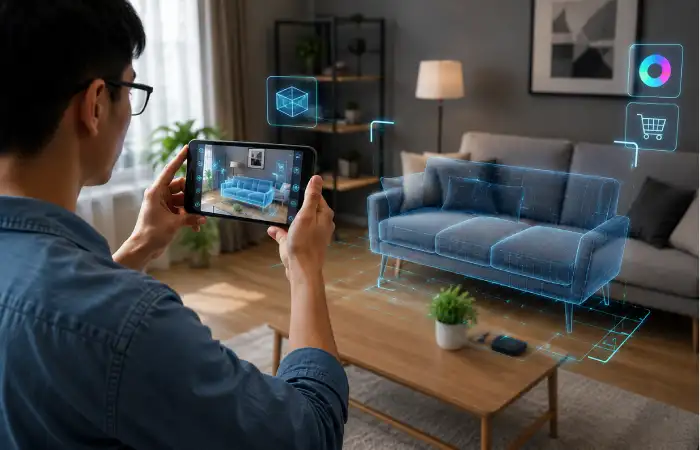
Augmented reality adds practical computer generated layers to real world, while the real world is not disappeared. According to Microsoft, augmented reality is a real-world experience that has been enhanced with computer generated, visual, auditory, and other multi-sensory cues, and digital input. In actual applications, it is more convenient when the digital layer is providing help, not disturbance.
This is why AR has become so practical in everyday use. It can guide users through a route, help shoppers preview a product at home, support field workers with instructions, or make learning more visual. AR works especially well when the task benefits from “seeing more” rather than “escaping the real world.” It is the most accessible doorway into spatial computing because it already fits into familiar devices and behaviours.
For AR to flourish it needs to see object recognition improve, its devices need to be lightweight and wearable, and software needs to become more contextual. As technology evolves AR will have much more to offer both in retail and travel but also in areas like medicine and remote assistance. The genuine power is not in some kind of superficial effects. Its the fact it’s possible to get information displayed right where it’s needed, when its needed.
Mixed Reality Systems
Mixed reality systems are where the physical and digital truly begin to cooperate. Microsoft defines mixed reality as a blend of physical and digital worlds that enables natural and intuitive 3D human, computer, and environmental interactions. That definition is important because MR is not just about overlaying graphics. It is about interaction, depth, anchoring, and spatial awareness.
It’s helpful to have a good mixed reality system which knows about the location of the walls, table and human in the scene. A virtual object is put onto the table and it will stay there as you walk around. That ability creates stronger realism and a more practical workflow. Designers can review models in room scale. Trainers can simulate procedures in controlled environments. Teams can collaborate around a shared 3D object as though it were really sitting in the space between them.
The biggest advantage of MR is context. A screen can show you a 3D model, but a mixed reality system can let you stand beside it, walk around it, and inspect it from different angles. That is much closer to how humans naturally learn and solve spatial problems. This is why MR has become such an important bridge between today’s devices and tomorrow’s computing experiences.
Virtual Reality Innovations
Improvements in virtual reality have continued to push the boundaries of immersion. “Meta” describes its Quest headsets as a device to help redefine what digital games and entertainment can be, while the developer guidelines differentiate VR from AR by defining it as an “incredibly engaging technology where your real world will be swapped out for a digital one.” It is that ability to transport the user into the digital world that gives VR power for activities where focus and simulation are of importance.
It is the places where VR really shines. This is primarily games, training, simulation and even some therapy. The strength of this system lies in environments where it can isolate you from external disturbances and you are able to solely focus on the world in front of you. It is therefore perfect for flight simulation, emergency training scenarios, architect tours and storytelling adventures. The downsides of VR have historically been Comfort, realism, and hardware weight and every generation is taking great leaps in making those improvements.
Apple Vision Pro Technology
It’s in that regard that the technology provided by Apple Vision Pro really cemented spatial computing in to public consciousness on a major level. Apple introduced its first spatial computer which was christened Vision Pro, and billed as spatial computing, a “spatial computer… Where digital content seamlessly mixes with physical space” which people can control with their eyes, hands and voice. Apple also states Vision Pro is capable of a infinite canvas for apps and fully three dimensional interface.
One reason Vision Pro stands out is that it does not treat spatial interaction as a gimmick. Apple built vision OS to support a new app model, where digital experiences can float, scale, and live alongside the user’s environment. The company has also highlighted machine learning features such as hand tracking, room mapping, and Personas, which are essential for making the experience feel responsive and believable.
Apple is marketing the Vision Pro for business use too, as a productivity, design and collaboration device, which I believe is a critical point; a new computing platform can’t only succeed in its entertainment capacity. People need to believe it saves time, improves focus, or unlocks workflows that are difficult on a normal screen. Apple’s business messaging and developer platform both point to that broader use case.
Immersive Computing
This broader field which encompasses all these (AR, MR, VR and spatial computing) goes by the name immersive computing. This describes how digital interfaces will feel more present, more contextual and more human. Instead of separating the computer from the user’s environment, immersive computing makes the environment part of the interface. That is why this field feels so different from the desktop era.
This is useful because it allows for deeper learning and better decision-making. Think about a student interacting with an anatomy model in 3-D, or an engineer investigating a prototype without ever having to print it, or even a remote team to all look at and discuss the same object. In all of these scenarios the computer isn’t displaying data; it’s using that data to create a spatial arrangement of that information that the brain understands.
As technology gets better, immersed computing is going to shift away from being “cool” and begin becoming functional, and I suspect the ultimate winner will be the applications that become so intuitive, easy to use, and comfortable, that you won’t even remember they are running in 3-D or on some form of 3-D computing, and thus the future of HCI is not more screens, but smarter spaces..
How Spatial Computing Will Change Human-Computer Interaction
- Natural User Interfaces – Instead of being restricted to keyboards, mice and touch-screens users will be able to control computers via hand gestures, eye tracking, voice commands and body motion.
- More immersive experiences – The real world will merge with digital data generating new and exciting experiences for business, education, entertainment, communications etc.
- Screen-Free Computing – Traditional monitors may become less important as virtual screens and 3D workspaces can be placed anywhere in a user’s environment.
- Increased Productivity: Profession will be able to use various virtual monitors and structure information spatially. They will be able to reach out for and manipulate the tools they need without any constraint on the physical display.
- Better Collaboration: Remote professionals working together can use 3D models, virtual environments, and virtual meeting spaces as if they were all together in one room.
- Improved Learning and Training: Students and employees can use virtual laboratories, real life training scenarios, interactive simulation, and many other features that improve learning.
- Smarter context-aware computing: Devices will become more aware of the environment, surroundings and will respond to its occupants based on context.
Practical Benefits at a Glance
| Area | Benefit of spatial computing | Why it matters |
| Productivity | Larger, more flexible workspaces | Helps users manage multiple tasks without a single fixed screen |
| Training | Simulated, hands-on learning | Improves practice in safe, repeatable environments |
| Design | 3D inspection in real space | Makes prototypes easier to understand |
| Collaboration | Shared immersive environments | Makes remote teamwork feel more present |
| Consumer experiences | More personal and interactive apps | Brings digital content closer to everyday life |
Conclusion
Spatial computing is not a far-off fantasy. It is already here, and it is slowly reshaping what computers mean in daily life. Augmented reality technology adds useful layers to the world. Mixed reality systems merge digital and physical spaces. Virtual reality innovations create deep immersion. Apple Vision Pro technology shows what a polished spatial platform can look like. And immersive computing gives us the broader vision of where all of this is going.