

Last Updated: June 23, 2026
Modern work simply relies on smart communication. It doesn’t matter if your company is small, if you run a distributed company, or if your employees work in a bustling, on-the-go environment – everything from the efficiency and accuracy of each task to employee culture is directly influenced by your team’s communications tools. Gone are the days where all you need to manage work chat were basic chat applications and meeting programs.
In today’s marketplace, some of the most talented employees leverage smart meeting devices, sophisticated business conversation technology, remote business communication tools and video conferencing devices that eliminate friction and create clear lines of communication and accelerated decision making.
These devices enhance our conversations, helping employees collaborate more effectively and think and react more quickly. These Smart Communication devices will bridge the gap that most often causes a communications log-jam.
Table of Contents
Why Smart Communication Devices Matter
It’s not just talking, but it’s getting the message out easily and quickly. If your team has the best ideas but a messy presentation space, bad audio, laggy screen sharing, or laborious collaboration, that’s time burned. Intelligent communication devices overcome this by introducing better sound, crisper images, and seamless sharing, as well as helpful automation into typical workflow.
They also foster more connection with the team, even when your collaborators are separated by hundreds of miles or even different continents.
In a work setting, these tools foster better work experience – video that clarifies misinterpretation, speakers that enhance meetings, and collaboration devices like tablets, wirelessly presented materials, and smart meeting technologies that ease collaboration.
Comparison Table: Common Smart Communication Devices
| Device Type | Best For | Main Benefit | Typical Use Case |
| Video conferencing devices | Teams and client meetings | Clear video and audio | Board meetings, remote interviews, webinars |
| Business communication gadgets | Office communication | Faster daily coordination | Desk use, call handling, team updates |
| Startup communication tools | Small growing teams | Low-cost efficiency | Agile team collaboration, sales calls |
| Remote collaboration gadgets | Distributed teams | Better teamwork across locations | File sharing, screen sharing, brainstorming |
| Smart meeting technology | Modern meeting rooms | Automated meeting experience | Hybrid meetings, presentations, group discussions |
Business Communication Gadgets

Business communication devices The daily workhorses of the office-from wireless headset to unified communications platforms-are crucial for a successful workplace. These are wireless headsets, smart desk devices, IP conferencing phones, IP smart conference speakerphones, smart conference systems, push-to-talk devices, and integrated instant messaging tools. They simply facilitate more and clearer conversations.
A business communication gadget that boosts the speed of response reduces confusion.
With a wireless headset, a manager can conduct a phone call while standing up and walk away from the computer while still talking; a smart desk gadget can be placed on the desk without taking up workspace to show a caller ID, and an IP conference speakerphone system may allow more people to participate in the meeting more cleanly and comfortably compared to taking a group conference call on a laptop computer.
What makes them useful
- Better call quality
- Hands-free communication
- Less background noise
- Faster office coordination
- Easier multitasking
Best fit for
- Sales teams
- Customer support teams
- Office executives
- Founders and managers
Video Conferencing Devices
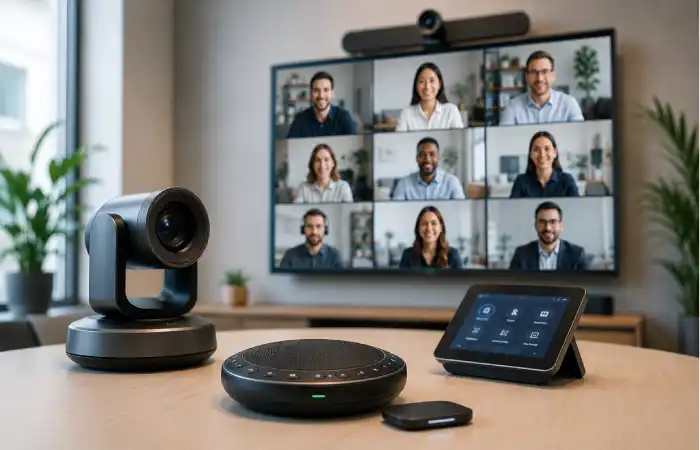
The Video conferencing setup has become the heartbeat of modern businesses. Laptop camera has come not to say the very least in many instances for team communication. Businesses are nowadays looking for much better quality video, audio and reliable assembly environment specifically once they collaborate with outside clients or business companions.
The video conferencing models come with options like HD camera, background sounds Cancelling microphone and so on. They can additionally come as a complete audio speaker and camera unit in conjunction with various kinds of models which can be for tiny convention room or huge meeting rooms.
Decent video conferencing gadgets can significantly boost the image of the corporation along with make sure increased participation and better decision-creating as members are aware of everyone and they are able to see emotions on someone face without any problem, thus making certain less follow up sessions required for clarification.
Key features to look for
- High-definition camera quality
- Wide field of view
- Echo and noise cancellation
- Simple plug-and-play setup
- Compatibility with major meeting platforms
Ideal use cases
- Client presentations
- Team standups
- Remote hiring interviews
- Training sessions
- Hybrid office meetings
Startup Communication Tools
Startups look for a communication solution that is adaptable, low cost and scale. For the larger organisation the cost of room systems, slow implementation, IT back office and complex systems do not affect business but for the startup team those additional costs and time is not practical or affordable. The team require the speed of a technology device that makes a small team fast.
Some of the more common devices that come to mind when discussing startup communication devices include portable video solutions, smart tablets, collaborative hub solutions, personal speaker phones & conferencing devices as well as Cloud communication platforms.
For a startup their communication device can influence their sales cycle pitches, to coordinating a product launch and help them establish a work ethic flow.
Startup-friendly advantages
- Lower setup cost
- Easy installation
- Lightweight and portable
- Works for small teams
- Grows with the business
Best for
- Founders
- Small sales teams
- Product teams
- Remote-first startups
- Early-stage companies
Remote Collaboration Gadgets
Remote collaboration technology was created by developers catering to remote and distributed teams (those spread across continents or even countries). Remote gadgets allow team members feel more connected to one another and ease much of the tension of meeting and collaborate strictly in digital mode alone. Some examples of technologies included above: Smart whiteboards with interactive display; Digital pens to take down the minutes; Wireless presentation tools; Tablets for collaboration; Multi directional speakers/microphone for audio.
With their interactive, remote workers feel more engaged and can share brainstorming sessions and contribute in a fluid manner.
The greatest benefit of technology gadgets remote and collaboration technology is bridging the gap created by physical distance. Instead of endless texts sent, ideas are shared instantly, White board documents have marks on them in real-time, so that people can move through discussion rapidly into action.
Helpful features
- Real-time screen sharing
- Multi-user input
- Cloud syncing
- Portable design
- Easy integration with team apps
Common use cases
- Design reviews
- Sprint planning
- Remote workshops
- Team brainstorming
- Project reviews
Smart Meeting Technology
Smart meeting technology allows for extremely productive communication. It includes hardware, software, and automation that eliminates common pain points in meetings, like smart displays, auto-framing cameras, voice commands, and digital whiteboards, and meeting rooms that can schedule, record, and summarize meetings. Smart meeting technology not only enables remote and hybrid collaboration but also enhances every meeting.
For busy teams that means less setup time and more focused conversation due to video and audio adjustments and automation such as auto-starting calls.
A smart meeting room may also appear calmer and more polished because the technology takes care of small details in the background while people talk.
What smart meeting tools can do
- Auto-focus speakers
- Improve room audio
- Display shared content instantly
- Support hybrid participants
- Reduce meeting delays
Comparison Table: Choosing the Right Device for Your Team
| Team Need | Best Device Type | Why It Works |
| Frequent client calls | Video conferencing devices | Professional sound and visuals |
| Daily internal coordination | Business communication gadgets | Fast, simple communication |
| Small startup team | Startup communication tools | Affordable and scalable |
| Distributed team brainstorming | Remote collaboration gadgets | Better teamwork across distance |
| Hybrid conference room | Smart meeting technology | Smooth meeting experience |
How to Choose the Right Smart Communication Device
When considering your communication solution, take into account the working method of your team. A small company of five people will hardly have same communication needs as a firm with daily board meetings. A proper solution can be found by determining the actual communications rhythm.
Think about these points before buying:
| Factor | Why It Matters |
| Team size | Larger teams need stronger audio and wider coverage |
| Work style | Remote, hybrid, or office-based teams need different tools |
| Ease of use | Simple devices save training time |
| Compatibility | The device should work with your current software |
| Budget | The right tool should create value, not pressure |
| Scalability | Good devices should grow with your team |
A smart device shouldn’t be a chore, after all. If it requires the user to waste time and mental space setting it up or trying to use it, that will hinder the group’s efficiency instead.
Benefits of Smart Communication Devices
Where it really kicks in is day-to-day work. Team meetings have been started exactly on time, communications received instantly and comprehended immediately, team members connected even when miles apart, and less of our managers’ valuable time spent fixing technical issues.
Some of the biggest benefits include:
- Faster decision-making
- Better team engagement
- Higher meeting quality
- Reduced communication errors
- Improved productivity
- Stronger collaboration culture
For businesses that want to stay competitive, these tools are no longer optional extras. They are part of the basic operating system of modern work.
Final Thoughts
Smart communication technology is transforming the way we meet, talk and resolve. Devices and services of this kind promote smoother talks, improved collaboration and more immediate responses. It can facilitate decision making at the workplace in a number of ways whether we opt for small business communication technology for the entire team, high-quality videoconferencing, smart meeting device as a backup during meetings and also communications gadget in the entire enterprise.
While most businesses, particularly startups with growing work force prefer to establish a new form of modern day device during the early stages and growth of the company, to ensure smooth working procedures, at the end of the line, everyone wants communication services that ease business communication.